---
updatedAt: 2026-02-12T13:35:59.000Z
agentTools:
projectIndex: https://docs.emergetools.com/llms.txt
---
# Migrate Content Providers to Jetpack App Startup (Android)
If you (or any third-party library) uses [Content Providers](https://developer.android.com/reference/android/content/ContentProvider) to initialize parts of your app, then you should migrate them to the [Jetpack App Startup](https://developer.android.com/topic/libraries/app-startup) library. Each content provider adds a penalization to your startup times. So, removing these providers can help to reduce your startup performance. The [Jetpack App Startup](https://developer.android.com/topic/libraries/app-startup) library provides a performant way to initialize components at application startup. Both library developers and app developers can use this library to streamline startup sequences and explicitly set the order of initialization.
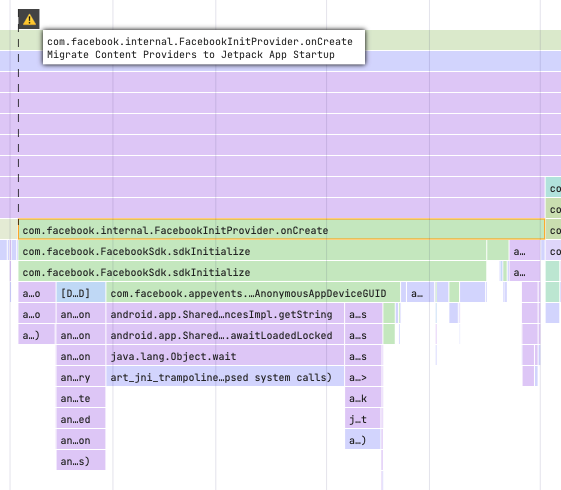
Some third-party SDKs automatically merge Content Providers int your app build by the Android build tools when doing a build with Gradle. Here are some examples of how to migrate them to the [Jetpack App Startup](https://developer.android.com/topic/libraries/app-startup) library:
## Firebase SDK
In your manifest, add an entry for **FirebaseInitProvider**, and make sure to use a node marker to set its **tools:node** attribute to the value "**remove**". This tells the Android build tools not to include this component in your app:
```xml
```
Because you removed **FirebaseInitProvider**, you’ll need to perform the same init somewhere in your app (in your own [Jetpack App Startup](https://developer.android.com/topic/libraries/app-startup) **Initializer**, to ensure Analytics can measure your app correctly):
```kotlin
if (FirebaseApp.initializeApp(context) == null) {
Log.w(TAG, “FirebaseApp initialization unsuccessful”)
} else {
Log.i(TAG, “FirebaseApp initialization successful”)
}
```
More info [here](https://firebase.blog/posts/2017/03/take-control-of-your-firebase-init-on).
## ML Kit
In your manifest, add an entry for **MlKitInitProvider**, and make sure to use a node marker to set its **tools:node** attribute to the value "**remove**". This tells the Android build tools not to include this component in your app:
```xml
```
Because you removed **MlKitInitProvider**, you’ll need to perform the same init somewhere in your app (in your own [Jetpack App Startup](https://developer.android.com/topic/libraries/app-startup) **Initializer**, to ensure Analytics can measure your app correctly):
```kotlin
MlKit.initialize(context)
```
## WorkManager
The [WorkManager](https://developer.android.com/topic/libraries/architecture/workmanager) library uses [Jetpack App Startup](https://developer.android.com/topic/libraries/app-startup) to automatically initialize since [v2.6.0](https://developer.android.com/jetpack/androidx/releases/work#version_260_3). Be sure to update your library to the latest version to improve your startup time.
## Facebook SDK
In your manifest, add an entry for **FacebookInitProvider**, and make sure to use a node marker to set its **tools:node** attribute to the value "**remove**". This tells the Android build tools not to include this component in your app:
```xml
```
Because you removed **FacebookInitProvider**, you’ll need to perform the same init somewhere in your app (in your own [Jetpack App Startup](https://developer.android.com/topic/libraries/app-startup) **Initializer**, to ensure Analytics can measure your app correctly):
```kotlin
FacebookSdk.sdkInitialize(context)
```
## Sentry SDK
In your manifest, add an entry for **SentryInitProvider**, and make sure to use a node marker to set its **tools:node** attribute to the value "**remove**". This tells the Android build tools not to include this component in your app:
```xml
```
Because you removed **SentryInitProvider**, you’ll need to perform the same init somewhere in your app (in your own [Jetpack App Startup](https://developer.android.com/topic/libraries/app-startup) **Initializer**, to ensure Analytics can measure your app correctly):
```kotlin
SentryAndroid.init(context, if (BuildConfig.DEBUG) NoOpLogger.getInstance() else SystemOutLogger())
```